
Set up Stripe in the new Retainly
Three quick steps, about 10 minutes. You only do this once.
Open Retainly in another tab and follow along:
Open RetainlyRetainly moved to new servers. Because of the switch, Stripe asks every business owner to confirm their account once more. Until step 3 is done, your clients' automatic payments stay paused so nobody is charged twice.
- 1Step 1
Set your password
Sign in with your email. The first time you'll get a code by email, then choose the password you'll use from now on.
What you'll see in Retainly
- 2Step 2
Set up Stripe
Here's what you'll see, so you know you're on the right page:
- a
Clicking Set up Stripe opens a Stripe page with a purple panel that says "Stencil uses Stripe for secure financial services". That's expected: Stencil is the platform Retainly runs on, and your details go to Stripe only.
- b
Enter the email you use for Stripe and click Continue.
- c
Sign in to Stripe with your usual login, or create a login if Stripe asks you to.
- d
Stripe shows your business details to confirm, and may ask for a document.
- e
When Stripe says you're done, you land back in Retainly and step 2 ticks itself.
What you'll see in Retainly
- a
- 3Step 3
Copy your clients' saved cards
(only if your clients pay by saved card)
- a
Open your old Stripe account in a new tab.
Open Stripe → Customers
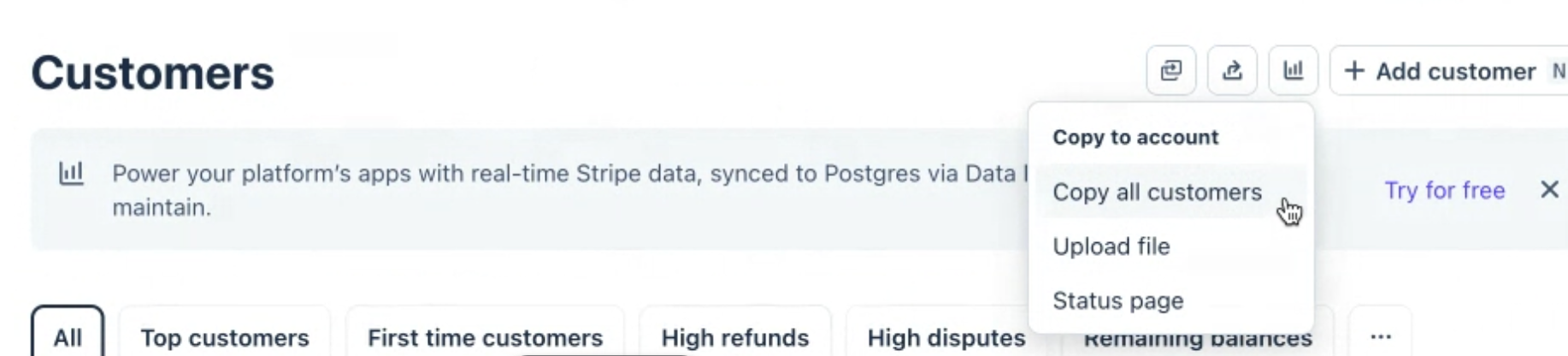
Look for this icon at the top right of your Customers page. See it?
Click it → Copy all customers → paste the account ID Retainly shows you → Continue → Confirm, then come back to Retainly and click I've requested the copy.
Don't see it? You're all set.
None of your clients has a card on file with you, so nobody has an upcoming installment or recurring payment that charges automatically. Click "This step doesn't apply to me" in Retainly and you're done.
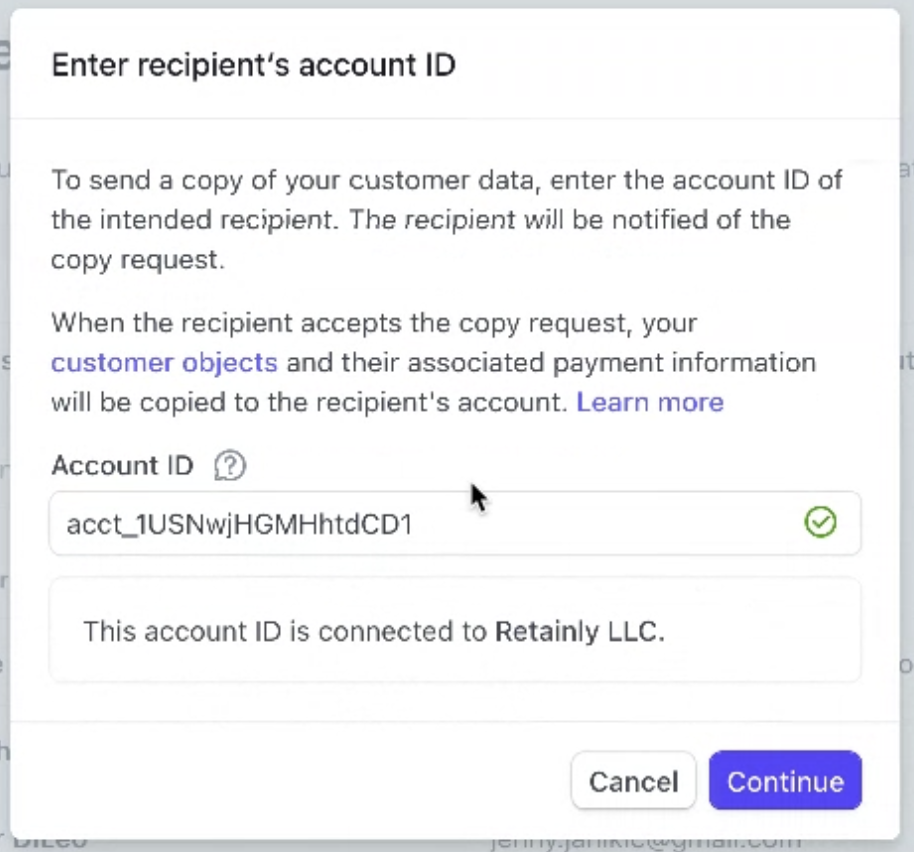
Paste the account ID Retainly shows you, then click Continue. 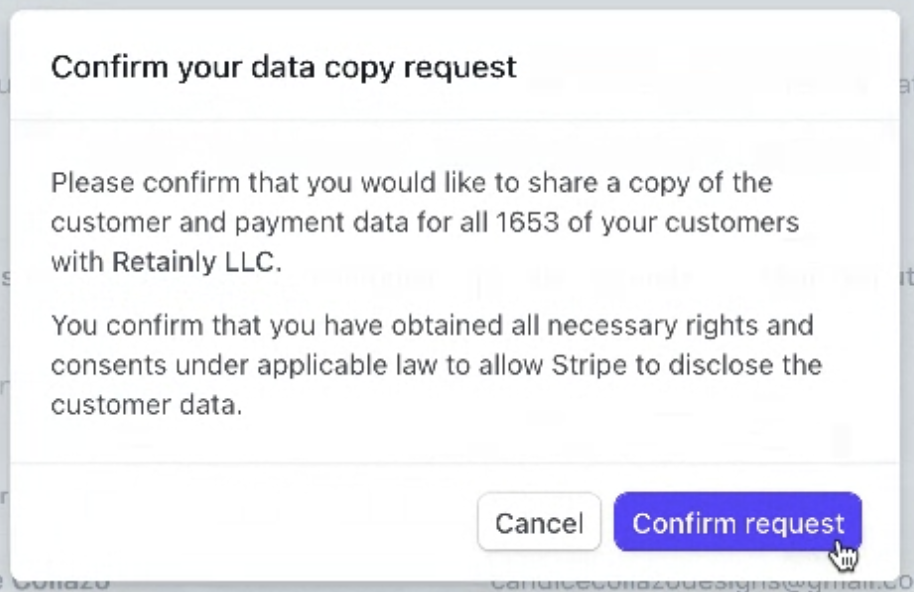
Click Confirm request. Your screen shows your own customer count. Don't see Copy customers?
Two usual reasons: your old Stripe account isn't fully activated (finish Stripe's Setup guide at the top right of its dashboard first), or you're signed in as a team member instead of the person who created the account (only the account owner, or someone they give the Data Migration Specialist role, can copy). If neither applies, write to support@getretainly.com and we'll help; your clients can still pay their next invoice by entering their card again.
What you'll see in Retainly
- a
What happens next
We approve the copy on our side, usually within hours. Your saved cards and automatic payments then pick up where they left off, and your clients get their usual payment emails. Nothing changes for your clients.
Thanks for bearing with us. Once your copy is confirmed, Claim your coffee lights up on your dashboard and your $5 coffee card arrives by email.
Questions? Reply to the email you got from us and we'll help.